Migrating from Sage 50 and Sage 50 MRP to Microsoft Dynamics 365 Business Central can be a strategic upgrade for UK manufacturers, especially those seeking scalability, integration, and modern ERP capabilities. Here are the key reasons why this move makes sense.
Is migrating from Sage50 & Sage MRP to Business Central Cloud ERP right for you?
Let’s look at an example MRP for Sage 50 Accounts (Cim 50’s the best, in our opinion)
CIM 50 fully endorsed and recommended by Sage UK.
For many Sage 50 users, Cim 50 has long been the go-to manufacturing solution. Whether replacing the now-retired Sage 50 Manufacturing module or moving away from spreadsheets and disconnected systems, Cim 50 has provided a robust MRP alternative with strong functionality and reliable performance.
At Qi, we have proudly partnered with Cim for many years, supporting businesses in streamlining their manufacturing operations. Cim 50 users consistently report satisfaction with system stability, features, and product updates.
Core modules & capabilities of Cim 50 MRP for Sage 50
| Stock Control | Advanced stock management beyond Sage 50’s native capabilities. Tracks stock levels, quarantine status, supplier details, and real-time projections. |
| Bill of Materials (BOM) | Supports multi-level BOMs with unlimited components. Includes costing, audit trails, and version control. |
| Works Orders | Manages production processes, work in progress (WIP), and resource capacities. Tracks allocation and issue of components and finished goods. |
| Planning | Material Requirements Planning (MRP) with just-in-time scheduling. Reduces excess stock and improves cash flow. |
| Quotations | Accurate costings for manufactured items. Helps improve profitability and quoting efficiency. |
| Shop Floor Data Capture (SFDC) | Uses barcoding to track production activities and improve accuracy. Real-time updates from the shop floor. |
| Graphical Scheduler | Visualises production schedules and workloads. Helps manage capacity and delivery timelines. |
| Traceability | Full batch and serial number tracking from goods receipt to despatch. Includes inspection details and usage history. |
| Reporting & Analytics | Real-time insights into production costs, lead times, and inventory turnover. Supports data-driven decision-making. |
| Supplier & Purchase Management | Multiple supplier records per item with lead times, pricing, and part numbers. Integrated purchase order management. |
Is It Time to Move from Sage MRP to Business Central?
As the needs of manufacturers evolve, so too must the systems that support them.
What are the evolving requirements of modern manufacturers in the UK
All-in-One ERP vs. Integrated MRP
- Cim 50 integrates with Sage 50 Accounts Professional and typically requires additional tools—like external CRM platforms—to form a complete business solution.
- Microsoft Dynamics 365 Business Central delivers finance, manufacturing, and CRM in a single cloud-based ERP built on one SQL database.
Customisation & Flexibility
- Cim 50 is not a development environment. Custom functionality must be built externally, often using tools like Microsoft Access, introducing potential compatibility and performance issues.
- Business Central is a full development platform. Enhancements are developed natively, ensuring seamless performance, version compatibility, and no sync issues.
Hosting & Accessibly
- Cim50 and Sage 50 require traditional server installations—whether on-premise or hosted in Azure—leading to increasing infrastructure and maintenance costs.
- Business Central is entirely browser-based. No hosting required. Access it from any device, anywhere, with an internet connection.
Why consider moving to Business Central?
Enhanced Functionality
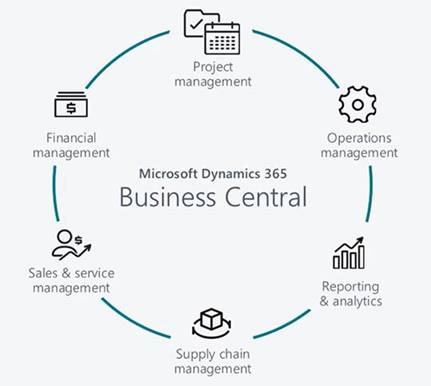
Business Central offers advanced manufacturing capabilities that go beyond standalone MRPs, including:
- Improved traceability
- Automation features
- Integrated workflows across departments
Microsoft Ecosystem Integration
With built-in connections to Microsoft 365, Power BI, and Power Automate, Business Central provides a powerful and intuitive environment for:
- Real-time business intelligence
- Automated workflows
- Collaborative decision-making
Data Integrity
- Sage 50 + MRP can be prone to data corruption due to legacy architecture.
- Business Central’s modern architecture is built to eliminate this risk, ensuring consistent, secure data management.
Scalability
- MRP’s for Sage 50 have a practical upper limit on users.
- Business Central scales fluidly from 1 to 100+ users, making it ideal for growing businesses and more complex operations.
Are You Ready to Make the Move to Business Central?
Get in touch with a member of our friendly team at QI.
Key benefits of moving to Business Central
1. Scalability and Growth
- Sage 50 is best suited for small businesses with limited growth needs.
- Business Central is designed to scale with your business, supporting complex manufacturing operations, multi-site management, and international expansion.
2. Unified Platform
- Business Central integrates ERP, CRM, finance, inventory, and MRP into one system.
- This eliminates silos and improves data visibility across departments, which is crucial for manufacturers managing supply chains and production schedules.
3. Advanced Manufacturing Features
- Offers Production Orders, BOMs, Routing, Capacity Planning, and integration with third-party MES systems.
- Supports Make-to-Order, Make-to-Stock, and Discrete Manufacturing workflows more robustly than Sage 50 MRP
4. Cloud-Based Accessibility
- Business Central is cloud-native, enabling remote access, mobile support, and real-time collaboration.
- Reduces reliance on on-premises infrastructure and IT overhead.
5. Integration with Microsoft Ecosystem
- Seamlessly connects with Power BI, Power Apps, Teams, Outlook, Excel, and other Microsoft 365 tools.
- Enhances productivity and reporting capabilities, especially for manufacturers using Microsoft tools for operations and communication.
6. Improved Reporting and Analytics
- Offers real-time dashboards, Power BI integration, and AI-driven insights.
- Helps manufacturers make data-driven decisions on production efficiency, inventory turnover, and cost control.
7. Security and Compliance
- Microsoft provides enterprise-grade security, automatic updates, and compliance with UK and EU regulations (e.g., GDPR).
- Reduces risk and ensures business continuity.
8. Lower Total Cost of Ownership
- Subscription-based pricing reduces upfront costs.
- Eliminates the need for expensive hardware upgrades and manual software updates.
Migration considerations
| Data Migration | Implementation Time | Customisation |
| Partners like Qi Ltd offer toolkits to migrate Sage 50 data comprehensively, including historical records. | Typical projects take 4–6 weeks including training and go-live support. | Business Central is highly customisable to fit specific manufacturing workflows. |
Qi explains the advanced features you gain when you move from Sage 50 MRP to Business Central
Microsoft Dynamics 365 Business Central offers a rich set of advanced manufacturing features that go far beyond what Sage 50 MRP provides. These capabilities are designed to support complex production environments, improve efficiency, and enable data-driven decision-making. Here’s a breakdown of the most powerful features:
1. Production Orders
- Manage full production lifecycles: from planning to execution.
- Supports Make-to-Order, Make-to-Stock, and Engineer-to-Order workflows.
- Includes routing, BOMs, work centres, and machine centres for detailed process control.
2. Material Requirements Planning (MRP)
- Automates replenishment based on demand forecasts, inventory levels, and production schedules.
- Helps avoid stockouts and overproduction by optimising material flow.
3. Capacity Planning
- Model shop floor capacity using work centres, machine centres, and calendars.
- Supports load balancing, efficiency tracking, and bottleneck identification.
4. Bill of Materials (BOM) and Routings
- Create multi-level BOMs with version control, scrap rates, and phantom items.
- Define detailed routing steps for each production process, including labour and machine time.
5. Shop Floor Control
- Real-time tracking of production progress, consumption, and output.
- Use production journals and time sheets to record labour and machine usage.
6. Assembly Management
- Ideal for light manufacturing or kitting operations.
- Supports basic BOMs and simplified production workflows.
7. Demand Forecasting
- Integrate sales forecasts with production planning.
- Align manufacturing output with market demand using predictive analytics.
8. Manufacturing Analytics & KPIs in Business Central
- Built-in reports and Power BI integration for:
- Work centre utilisation
- Production scrap
- Actual vs. expected costs
- Planned vs. finished quantities
- Enables ad-hoc analysis and executive dashboards for performance monitoring.
9. Version Control and Templates-
- Maintain multiple versions of BOMs and routings.
- Use templates for recurring production setups to save time and reduce errors.
10. Integration with Finance and Inventory
- Seamlessly connects manufacturing with accounting, purchasing, and inventory.
- Provides a unified view of costs, margins, and stock levels across the business.
Want to Learn More About Our Migration Support?
Make your move with confidence with QI. Our team is ready to support you.
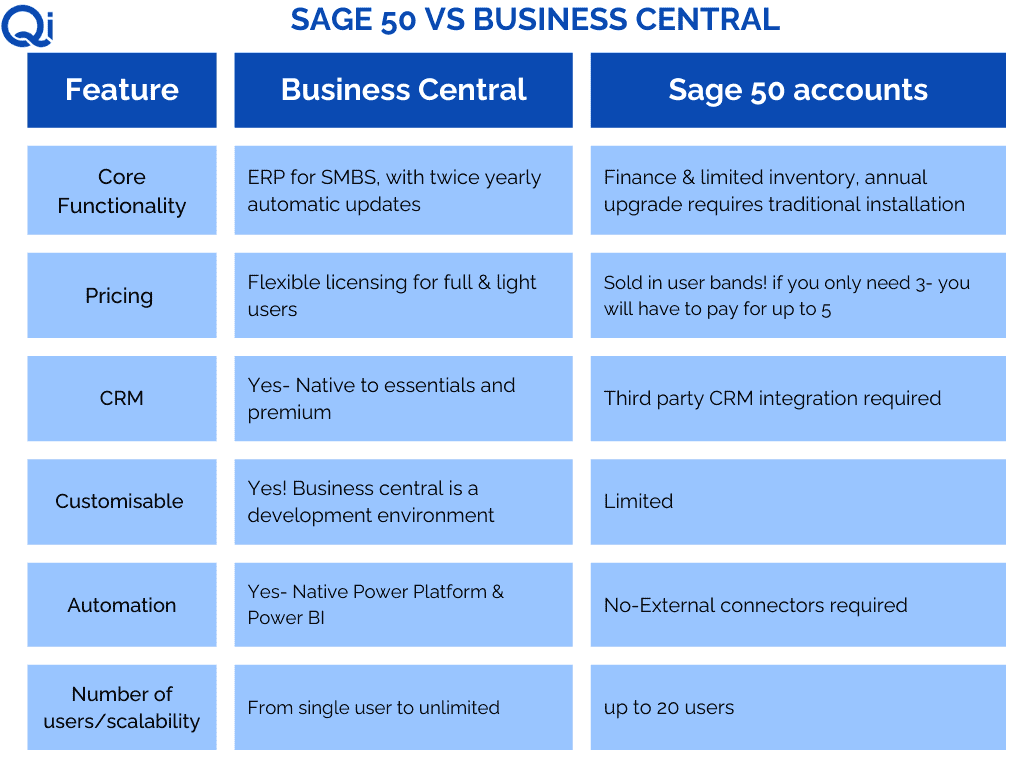
Qi explains CRM, Sage 50 and Business Central as part of your move from Sage 50 MRP
Sage 50 CRM in Integration
- Sage 50 does not have a built-in CRM, but it can be integrated to third party CRM soloutions
- This integration is not native and requires setup and maintenance.
- Features available via integration:
- 360° customer view (orders, invoices, product info)
- Synchronization of customer and sales data
- Sales quote generation and customer service tracking
- Marketing campaign integration (e.g., Mailchimp)
Business Central CRM Capabilities
Business Central includes CRM features such as:
- Contact and account management
- Opportunity tracking
- Interaction logging
- Sales quote and order management
- This is native functionality found in both Essentials and Premium
For advanced CRM, Business Central integrates natively with Dynamics 365 Sales (part of the Dynamics 365 CRM suite)
- Lead and opportunity management
- Sales forecasting and pipeline tracking
- Marketing automation
- Customer service and support tools
- Integration via Dataverse for seamless data flow
The Bottom Line
- Many MRP solutions for Sage 50 remain dependable and cost-effective solutions for Sage 50 users. However, if your business is growing, becoming more complex, has multiple sites or simply needs more—from traceability and automation to seamless integration and scalability—it may be time to consider moving to Microsoft Dynamics 365 Business Central.