Cyber security is a growing risk for businesses of all sizes, not just large organisations. Many SMEs are targeted because attackers know that small gaps in security are often easier to exploit.
Commonly, it’s not complex attacks that cause the most damage, but small, everyday things, slipping under the radar, during busy workdays. This article breaks down some (but not all) simple security tips and protocols, you can apply and deploy to help protect your systems and keep your business infrastructure, and those that use it, safer.
Research shows that over 60% of SMEs are likely to face a cyber-attack due to a lack of comprehensive security. Even a single breach can cause serious financial and reputational damage, with many small businesses struggling to recover afterwards.
Cyber security often feels like something that only needs attention after something has gone wrong. The most common security issues start with small, everyday habits that slowly get overlooked with time. They become the ‘norm’ and that can be dangerous. Your Cyber Health gradually declines, and no one notices, until it is too late.
Qi understands that all businesses and particularly SME’s face a day of different hats and substantial workload. Where priority is to ‘get the job done’. Infrastructure security is not at the top of everyone’s priority list, but this does not make the security dangers any less real, or any less likely.
Conversely, as an infrastructure security is commonly an ‘afterthought’ or reliant on the recommendations of an external IT specialist, SME’s who may be oblivious to changing cyber attack methods, thus do not put extra measure in place – can be the ‘softest’ target.
Safe and secure passwords
That’s obvious, right? But when did you last consider the strength or your passwords?
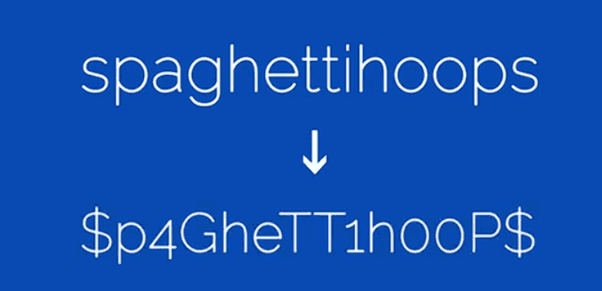
It may seem simple BUT having a strong password does go a long way and you will be grateful you made sure you set a password that is both filled with special characters and numbers as this makes it much more difficult for someone to force their way through your system.
This may seem like a ‘no-brainer’ initially, but when we dig deeper, we start to realise passwords are often reused or kept overly simple due to being easier to remember, especially when people are juggling lots of systems daily. Over time, this can quietly increase risk without anyone realising.
Take a few extra minutes to strengthen passwords and reduce the chance of unauthorised access. This helps to protect not just individual accounts, but the wider business systems that will be connected to them.
Below is an example from our hardware team showing how a weak password can be changed into something more secure and much harder to guess
Lock your computer whenever you walk away
No matter the situation, whenever you are away from your computer whether that’s to have a chat with co-workers, going for lunch or for any other reason, make sure you lock it! This can be done by holding down the Windows key on your keyboard and pressing L.
Locking your keyboard prevents anybody from sneaking up to your computer and getting access to files they do not need, should not view or could maliciously alter. No matter the location: office, event, coffee shop or collaboration space – LOCK IT!

WINDOWS ICON + L = LOCKED = SECURE!
Keep your software up to date!
Software updates are one of the most important things you need to consider when using your work computer daily especially with sensitive files you can’t afford to lose. One of the main reasons software updates are important is that they can potentially fix threats that could expose your computer to attacks.
It might cause minor frustration when an update is ready to install but ensuring your computer software stays up to date is a minor pause in your day in the scheme of things and it is a critical business imperative that directly impacts security, stability, and legal compliance. Having outdated software is one of the main causes for system downtime, security breaches, and poor performance. Losing access to your mailbox and files because of a breach will lose you considerably more time than accepting an update!
Tip!
Check for additional useful updates via ‘view additional updates’. This will provide information regarding outdated or missing drivers.
How do you know if your computer needs updating?
It is quick and easy to check manually if your computer needs updating
Open the start menu at the bottom if your screen start to type ‘updates’ and select check for updates as pictured below


Signs your computer needs updating
We all forget things from time to time and if checking for updates has not been part of your routine lately, these tell-tale symptoms may remind you that your device needs some TLC!
Do not ignore them!
- Performance issues
Programs are taking longer than usual to open, and overall, just seem a bit sluggish than normal
- Security Alerts
You are receiving notifications about expired security protocols or risks
- Errors and crashes
Frequent blue or black screen errors occur
- Noisy Fans
When the fan starts to run consistently or loudly, this tends to indicate there is an overheating or high system usage
- Old version
If you are still running Windows 10, assume that you are out of security updates and therefore vulnerable. This Microsoft article provides the detail but unless you are subscribed to an ESU programme – you need to move to Windows 11 – NOW!
Be Vigilant! Links in emails
Lastly, but certainty not least you need to consider emails!
Specifically links that are IN emails!
This can include members of your workforce as their account may have been seriously compromised and the hacker may have control of one of your work accounts. Cyber criminals often use the email method to try and gain further company information or to further attack the endpoint where a colleague may have inadvertently opened or clicked on something onerous, which has opened the door to further attacks.
CHECK EVERY LINK THAT COMES INTO YOUR INBOX BEFORE CLICKING ON IT!
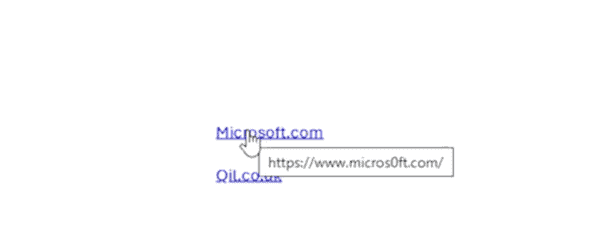
To check the origin of links included in emails, simply hover over the link (see illustration below) and the originating path will appear. If that path looks particularly suspicious or has for example incorrect or unusual spelling (e.g.: v1rgin@yahoo), it is crucial not to ‘click’ on the link as this may open a further and more dangerous gateway into a user account and potentially the entire network
We hope this ‘How To’ guide has helped!
This step-by-step article highlighted some seemingly obvious basic checks but these key checks and tips will help you to keep your accounts and infrastructure safer. If our advice isn’t ‘anything new’ we hope that it has at least reminded you of the basic fundamentals regarding Cyber Health practices.
For more ‘How to’ articles, visit our website.
Need extra help keeping your business secure?
We hope this ‘How To’ providing basic security tips has been helpful and demonstrated how small, everyday actions and disciplines can make a big difference to your overall Cyber security.
The Qi infrastructure security team is here to help you
We work with SMEs every day to help strengthen security, reduce risk, and put practical, effective, manageable processes in place to keep your business working securely!
Whether you need advice, reassurance, or ongoing support, we are always happy to have a conversation and help you take the next steps towards keeping your systems and data protected